
Canon EOS R6 Mark III Review: 90 Days as a Professional Photographer (Long-Term Review)
The Canon EOS R6 Mark III is the best all-around hybrid camera I've used, and as a decade-long Sony shooter, that's not something I say lightly.
Buy → $2,799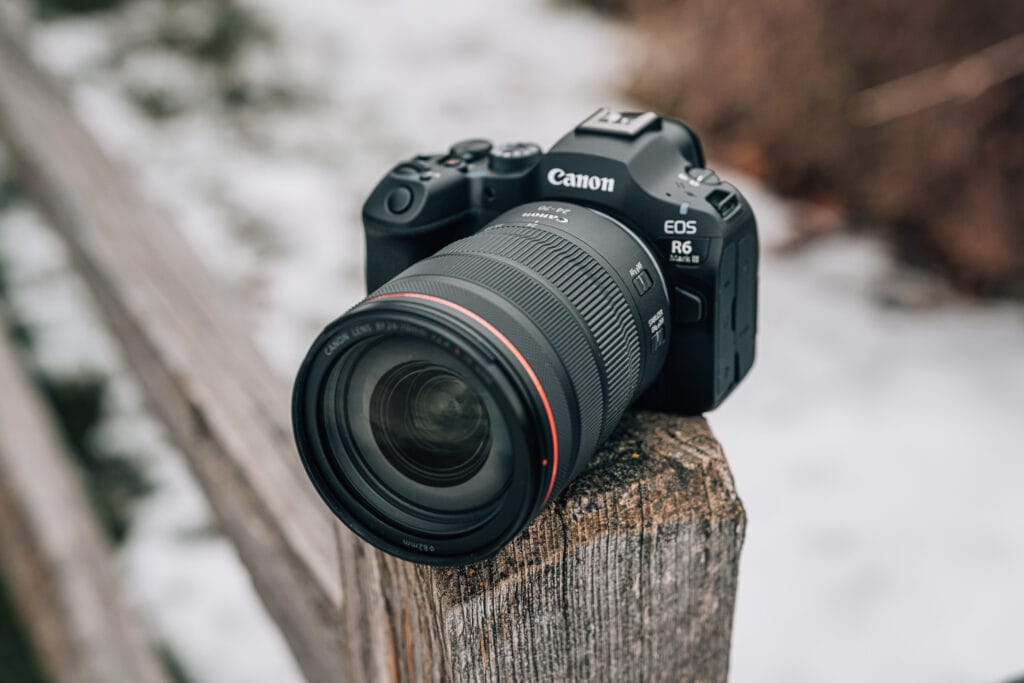
What We Like
- Best-in-class ergonomics with perfectly positioned D-pad for natural thumb placement
- Up to 8.5 stops of image stabilization — nearly eliminates the need for a gimbal
- Exceptional low-light autofocus that locks on confidently in near-darkness
- 40fps burst mode with high keeper rate for sports and action photography
- 7K open gate RAW video recording internally in a compact hybrid body
What Could Improve
- Switching between mechanical and electronic shutter for burst modes requires manual toggling — should be automatic
- Flip-out screen doesn't also tilt up for waist-level shooting like some Sony models
- Battery life matches previous generations rather than improving despite the higher price
- 7K video produces massive file sizes requiring expensive CFexpress Type B cards and significant storage
- Camera grip could be slightly deeper for photographers with larger hands who may need an extended grip
By Jerad Hill | Updated February 2026
After shooting with the Canon EOS R6 Mark III every day for 90 days as a working professional photographer, here’s my honest, in-depth long-term review covering everything from ergonomics and autofocus to 7K video, image stabilization, and whether this camera is worth the $2,799 investment.
As someone who has been a professional photographer for over 26 years and a dedicated Sony shooter for the last decade, I don’t take it lightly when I say a Canon camera has genuinely impressed me. The Canon EOS R6 Mark III isn’t just an incremental upgrade — it’s a camera that made me question my own gear choices. This isn’t a first-impressions review based on a few hours with the camera. This is what it’s actually like to live with the R6 III for three months, shooting real client work, testing it in challenging conditions, and pushing it to its limits.
If you’re considering the Canon EOS R6 Mark III for professional work, upgrading from the R6 II, or trying to decide between this and a Sony or Nikon alternative, this review is for you.
Canon EOS R6 Mark III Key Specifications
Before diving into the hands-on experience, here’s a quick overview of what the R6 III brings to the table:
- Sensor: 32.5MP full-frame CMOS (up from 24.2MP on the R6 II)
- Processor: DIGIC X
- Continuous Shooting: Up to 40fps (electronic shutter), 12fps (mechanical shutter)
- Image Stabilization: Up to 8.5 stops IBIS (center), 7.5 stops (periphery)
- Video: 7K/60p RAW Light internal, 4K/120p, Full HD/180fps
- Autofocus: Dual Pixel CMOS AF II with Register People Priority
- Card Slots: CFexpress Type B + UHS-II SD
- Battery: LP-E6P
- Price: $2,799 body only – See Current Pricing
Now, let’s get into what really matters — how this camera performs when you’re actually using it.
Ergonomics and Build Quality: Built for My Hand
The first thing I noticed when I picked up the Canon EOS R6 Mark III was how natural it felt. This camera feels like it was designed specifically for my hand, and I’ve heard similar feedback from other photographers. Canon has absolutely nailed the ergonomics on this body.
The D-Pad Placement Is a Game Changer
One of the standout design decisions is the placement of the D-pad (the joystick/toggle used for moving your autofocus point). On the R6 III, it sits exactly where your thumb naturally rests. Even though modern autofocus systems are incredibly capable, I still prefer to manually move my autofocus point to control exactly where the camera locks focus. With the R6 III, doing this feels effortless.
Compare that to Sony cameras, where the joystick is positioned lower on the body. I’m constantly having to shift my thumb down to find it, which over a long wedding or event shoot becomes fatiguing. It seems like a minor detail, but after 90 days of daily use, this placement difference is one of the things I appreciate most about this camera.
Button Layout and Controls
Canon has dialed in the overall button layout on this camera. The dedicated photo/video toggle switch makes it incredibly easy to switch between shooting modes without diving into menus. The record button on top of the camera is well-positioned for hybrid shooting — when I’m primarily shooting photos and need to grab a quick video clip, I can reach it without changing my grip.
The grip depth is generous, though photographers with larger hands may want to consider an extended grip since your pinky finger can hang off the bottom slightly. That said, the overall build quality and feel is excellent, and I have zero complaints about the handling of this camera.
Flip-Out Screen: Great Quality, Missing a Feature
The rear LCD on the Canon EOS R6 Mark III is one of the best screens Canon has ever put on a camera. It’s highly responsive to touch input — pinching to zoom, swiping between images, and navigating menus all feel like using a small smartphone screen on the back of the camera. For quickly checking sharpness and reviewing images in the field, this screen is a genuine pleasure to use.
However, there’s one feature I wish Canon would implement: a tilt-up display. The current screen only flips out and rotates to the side. While this works well for vlogging and shooting in portrait orientation (you can rotate the screen downward), I’ve never been a fan of having the screen positioned off to the side of the camera body when shooting in landscape orientation. Sony has started offering screens that both tilt up and flip out on some of their newer models, and I’d love to see Canon follow suit.
Is this a dealbreaker? Not at all. But it’s one area where Canon could improve in future models.
Image Stabilization: Best-in-Class Performance
If there’s one feature that sets the Canon EOS R6 Mark III apart from nearly every other camera I’ve used, it’s the image stabilization. Canon claims up to 8.5 stops of stabilization at the center of the frame and 7.5 stops at the periphery, and in real-world use, those numbers feel legitimate.
Handheld Video Without a Gimbal
When you pair the R6 III’s IBIS with a lens that has optical image stabilization (like the Canon RF 24-70mm f/2.8 L IS USM), the results are remarkable. I was able to shoot handheld video that looked gimbal-stabilized. For photographers and videographers who want to travel light and avoid carrying a gimbal to every shoot, this is a significant advantage.
Slow Shutter Confidence
For still photography, the stabilization gives me confidence to drag the shutter for creative long exposure effects without needing a tripod. Whether I’m shooting at 1/8th of a second for ambient light at a reception or trying to capture motion blur intentionally, the R6 III holds steady in ways that other cameras simply can’t match.
On top of the optical and in-body stabilization, there’s also a software-based stabilization layer you can enable for video. I haven’t needed to use it much since the optical stabilization alone is so effective, but knowing it’s there as a backup for talking-head videos or interviews without a tripod provides extra peace of mind.
40fps Continuous Shooting: Speed With a Caveat
The Canon EOS R6 Mark III can fire off up to 40 frames per second in electronic shutter mode, and it also offers 20 frames of pre-continuous shooting — meaning the camera buffers images before you fully press the shutter so you never miss the decisive moment.
Real-World Performance in Fast Action
I used the 40fps burst mode extensively while shooting high school basketball and other fast-moving scenarios. The results were impressive. When following action and holding down the shutter, I consistently came away with more than enough sharp, usable images from each burst. Out of a sequence of 100+ continuous frames, the vast majority were tack-sharp and perfectly usable.
That said, I did notice that when a subject was rapidly changing distance from the camera (for example, a player driving toward the basket), some frames in very long bursts would show slight softness. This could be attributed to a combination of minor rolling shutter effects from the electronic shutter and the autofocus system working hard to keep up with both tracking and continuous capture at 40fps. But to be clear — the keeper rate is still excellent, and you’ll always have plenty of sharp shots to choose from.
The Electronic Shutter Switching Frustration
Here’s my one legitimate gripe with the burst mode implementation. To access the 40fps continuous shooting speed, you need to switch to electronic shutter mode first. Most of the time, I prefer shooting in mechanical shutter mode to avoid any potential rolling shutter artifacts and to maintain compatibility with flash. When a fast moment happens and I want to jump into high-speed continuous, I have to manually switch from mechanical to electronic shutter, then select the continuous drive mode.
Ideally, the camera would automatically engage the electronic shutter when I select high-speed continuous and then revert to mechanical when I go back to single-shot mode. Having to make this switch manually every time adds friction and slows me down in situations where speed matters most. After practice, I can make the switch quickly, but Canon should make this more seamless in a future firmware update.
Video Capabilities: 7K Open Gate and Beyond
The Canon EOS R6 Mark III is a true hybrid camera, and its video specifications reflect that. Having access to 7K open gate recording in a camera at this price point is remarkable.
My Typical Video Workflow
For most of my video work, I’m shooting 4K at 30fps, sometimes bumping up to 60fps for subtle slow motion, and occasionally using 120fps at 4K for dramatic slow-motion sequences. These modes work flawlessly and produce excellent footage.
When 7K Open Gate Makes Sense
The 7K open gate recording shoots in 12-bit Canon RAW Light internally to a CFexpress Type B card. It’s an incredible amount of resolution and detail. However, it’s not something I reach for on every shoot.
The primary advantage of 7K open gate is the ability to crop, reframe, and adjust composition in post-production without losing resolution — since most delivery formats are 4K or 1080p. If I need to punch in on a subject or shift the framing after the fact, 7K gives me enormous flexibility. I also use a Sony camera capable of 8K video, and my approach is the same — I only shoot at the highest resolution when I know I’ll need the extra real estate for cropping or reframing.
For a camera of this size and price, the fact that you have access to 7K RAW recording internally is a feature that would have required a dedicated cinema camera just a few years ago.
Battery Life: Realistic Expectations
Battery life on the Canon EOS R6 Mark III uses the LP-E6P battery, and Canon has optimized this generation for improved performance. My real-world experience over 90 days is that the battery life is comparable to what I experienced with the R6 Mark II and the original R6.
Why “The Same” Battery Life Is Actually Fine
I know some photographers are disappointed that battery life hasn’t dramatically improved from one generation to the next. But here’s how I look at it: the R6 III is packing significantly more processing power, a higher resolution sensor, faster continuous shooting speeds, and more advanced autofocus algorithms than its predecessors. The fact that it maintains the same battery endurance while doing considerably more work under the hood is actually an engineering achievement.
For a full day of shooting — mixing stills and video — I always carry spare batteries regardless of which camera I’m using. The R6 III’s battery life has never caused me to miss a shot or run out of power at a critical moment, and that’s what matters in professional use.
Low-Light Autofocus: This Camera Sees in the Dark
If you’ve ever shot a dimly lit reception, an evening ceremony, or any other challenging low-light scenario, you know the frustration of a camera that hunts endlessly for focus. This was always one of my biggest pain points with previous camera bodies.
The Canon EOS R6 Mark III essentially eliminates this problem. The autofocus system on this camera is exceptional in low light, maintaining fast and accurate focus acquisition even in conditions where my eyes struggle to see the subject clearly.
This is one of those features that sounds like marketing speak until you experience it firsthand. When I pick up the R6 III in a dark environment and the camera just locks focus instantly and confidently, it genuinely changes how I approach low-light shooting. I worry less about whether I’m going to get the shot and focus more on composition and timing.
For wedding photographers, event photographers, and anyone who regularly shoots in challenging lighting conditions, the low-light autofocus performance alone is a compelling reason to consider this camera.
Register People Priority: A Welcome Addition
The Canon EOS R6 Mark III introduces Register People Priority, a feature borrowed from Canon’s flagship cameras. This allows you to photograph a person and register their face in the camera, so it will prioritize focusing on them over other people in the frame.
For wedding photographers who need to consistently track the bride or groom in crowded scenes, or portrait photographers who need to maintain focus on a specific subject in group settings, this is an incredibly practical feature. You can register up to 10 different people, making it versatile for various shooting scenarios.
Who Should Buy the Canon EOS R6 Mark III?
After 90 days of extensive use, here’s my honest take on who this camera is best suited for:
Professional and Aspiring Professional Photographers
If you’re building a photography business or upgrading your gear to deliver better results for clients, the R6 III is an outstanding choice. The combination of reliable autofocus, excellent image stabilization, strong low-light performance, and a versatile feature set means this camera will handle weddings, events, portraits, and commercial work with confidence.
Hybrid Photo and Video Creators
For content creators, filmmakers, and photographers who need strong video capabilities alongside professional stills performance, the R6 III delivers on both fronts. The 7K open gate recording, 4K/120p slow motion, and Canon Log 2 support make it a capable production tool.
Upgraders from the R6 or R6 Mark II
If you’re coming from the original R6, the upgrade to the Mark III is substantial — more resolution (32.5MP vs 20.1MP), better autofocus, improved stabilization, 7K video, and a CFexpress card slot. From the R6 Mark II, the improvements are more incremental but still meaningful, particularly in resolution, autofocus algorithms, and video capabilities.
Canon vs. Sony: A Difficult Choice
This is hard for me to admit as a longtime Sony shooter, but if I were starting from scratch today or advising someone choosing their first professional mirrorless system, it would be very difficult for me to recommend Sony over Canon based on the R6 Mark III alone. Canon has created a camera that excels in ergonomics, stabilization, autofocus reliability, and hybrid capabilities. The Sony ecosystem has its own strengths (lens variety, third-party support, and some specific technical advantages), but Canon has closed the gap significantly with this camera.
Canon EOS R6 Mark III Pros and Cons
What I Love After 90 Days
- Ergonomics — Best-in-class grip and button layout, especially the D-pad placement
- Image Stabilization — Up to 8.5 stops makes handheld shooting (photo and video) remarkably stable
- Low-Light Autofocus — Focuses confidently in near-darkness
- 40fps Burst — Excellent for action and sports with a high keeper rate
- 7K Open Gate Video — Cinema-level recording in a compact hybrid body
- Build Quality — Feels professional and reliable in daily use
- Touchscreen — Responsive and intuitive, like a small smartphone
What Could Be Improved
- E-Shutter Switching — Requiring manual switch between mechanical and electronic shutter for burst modes adds friction
- No Tilt-Up Display — The flip-out screen doesn’t also tilt up for waist-level shooting
- Battery Life — Comparable to previous generations, not improved (though understandable given added features)
- File Sizes in 7K — Massive files require fast CFexpress cards and significant storage
Final Verdict: Is the Canon EOS R6 Mark III Worth It?
After 90 days of professional use, I can confidently say the Canon EOS R6 Mark III is one of the best hybrid cameras available today. It’s well-priced at $2,799 for what it delivers, and it has never left me hanging when I needed it to perform.
There are limitations — no camera does absolutely everything perfectly. But as a prosumer to professional-level hybrid camera that delivers outstanding photos and video, you’ll be hard-pressed to find a better all-around option in this price range.
Whether you’re a Canon shooter looking to upgrade, a photographer considering switching systems, or someone stepping into professional photography for the first time, the Canon EOS R6 Mark III deserves serious consideration.
Resources
- Canon R6 III Sample Image Gallery — See real-world images shot with this camera
- Canon R6 III Quick Start Guide — Learn everything about your R6 III and how to get the best images possible
- Get My Free Photography Newsletter — Weekly tips, gear insights, and photography education delivered to your inbox
Gear Used in This Review
- Canon EOS R6 Mark III Body
- Canon RF 24-70mm f/2.8 L IS USM Lens
- Prograde Digital CFexpress Type B Card
- Prograde Digital SD Card
Some of the links above are affiliate links. Purchasing through these links helps support my content at no additional cost to you.
Final Verdict
After 90 days of professional use, I can confidently say the Canon EOS R6 Mark III is one of the best hybrid cameras available today. It's well-priced at $2,799 for what it delivers, and it has never left me hanging when I needed it to perform. There are limitations — no camera does absolutely everything perfectly. But as a prosumer to professional-level hybrid camera that delivers outstanding photos and video, you'll be hard-pressed to find a better all-around option in this price range.
Whether you're a Canon shooter looking to upgrade, a photographer considering switching systems, or someone stepping into professional photography for the first time, the Canon EOS R6 Mark III deserves serious consideration.
Frequently Asked Questions
Is the Canon EOS R6 Mark III worth the upgrade from the R6 Mark II?
How does the Canon R6 III compare to the Sony A7 V?
Is the Canon R6 Mark III good for wedding photography?
Does the Canon R6 III overheat during video recording?
What memory cards should I use with the Canon R6 III?
Is the Canon R6 III good for beginners?
How is the Canon R6 III autofocus in low light?
Can the Canon R6 III replace a dedicated video camera?
What lenses work best with the Canon R6 III?
Should I buy the Canon R6 III or wait for the next model?
