
How to Set Up a Multi-Camera Live Stream: A Complete Professional Guide
Quick Answer
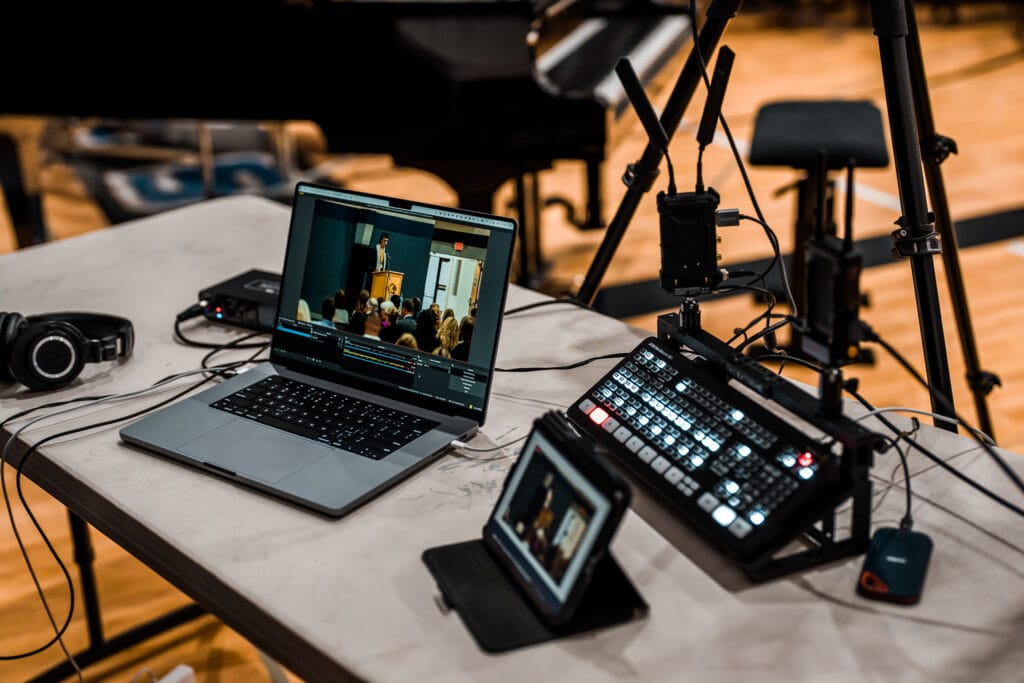
A professional multi-camera live stream setup requires cameras with HDMI output, a video switcher like the Blackmagic ATEM Mini Pro, wireless transmitters to eliminate cable runs, a two-channel audio interface with a backup mic, and OBS for broadcasting—all connected to a hardwired internet connection. Start with two cameras, always keep one hardwired as a failsafe, and test everything end-to-end before you go live.
What You'll Need
Frequently Asked Questions
What cameras do I need for multi-camera live streaming?
Any camera with HDMI output can be used for multi-camera live streaming. You don't need dedicated streaming cameras—mirrorless cameras like the Sony a7 IV, Canon EOS R6, or similar models produce excellent results and can double as your photography and video cameras for other paid work. The key requirement is a clean HDMI output that sends the live video signal to your switcher. I recommend starting with cameras you already own to keep your initial investment low.
Can one person run a multi-camera live stream solo?
Yes, absolutely. I regularly run professional multi-camera live streams as a solo operator with two to four cameras. The key is setting up unmanned cameras on tripods with fixed compositions, keeping one camera within arm's reach for quick adjustments, and using a video switcher like the Blackmagic ATEM Mini to cut between angles. Having helpers makes setup and teardown faster, and dedicated camera operators improve shot quality for dynamic events, but solo operation is completely viable for most live streaming scenarios.
How much does a multi-camera live streaming setup cost?
The cost depends heavily on what equipment you already own. If you have cameras with HDMI output, the main additions are a video switcher (the Blackmagic ATEM Mini Pro starts around $350), wireless HDMI transmitters (Hollyland Mars 400S kits are around $200–$300 each), a two-channel audio interface ($100–$200), power solutions, and an external SSD for recording. A complete two-camera wireless setup can be built for roughly $1,000–$1,500 on top of existing camera gear. The ATEM Mini Pro ISO adds around $200–$300 more if you need individual camera recording.
Do wireless video transmitters work reliably in crowded rooms?
Based on my extensive professional experience, yes. I've used Hollyland wireless HDMI transmitters in rooms with 450+ people carrying cell phones and experienced zero connectivity issues. I've broadcast signals from one corner of a stage to the opposite back corner of a large room, directly over the entire crowd, without a single dropout. Modern wireless video transmitters like the Hollyland Mars 400S and Cosmo C1 are designed for professional production environments and handle crowded RF conditions very well.
What's the difference between the ATEM Mini Pro and the ATEM Mini Pro ISO?
Both the ATEM Mini Pro and the ATEM Mini Pro ISO record your switched program output to an external USB SSD, giving you a clean, fully edited recording of the live stream. The ISO version adds the ability to simultaneously record each individual camera feed as a separate file, along with a DaVinci Resolve project file for post-production editing. Choose the standard Pro if you only need the switched output. Choose the ISO if your clients want you to re-edit footage, create social media clips, or produce highlight reels from the individual camera angles after the event.
What internet speed do I need for live streaming?
For a stable 1080p live stream, you'll want a consistent upload speed of at least 10 Mbps. However, raw speed is less important than consistency—a stable 15 Mbps connection is far better than a fluctuating 50 Mbps connection. Always use a hardwired Ethernet connection rather than Wi-Fi whenever possible, especially in venues with large crowds where hundreds of devices are competing for wireless bandwidth. I also recommend having at least one backup internet option (Starlink, mobile hotspot) in case your primary connection fails.
What is the best free software for multi-camera live streaming?
OBS Studio (Open Broadcaster Software) is the industry-standard free software for live streaming, and it's what I use for all of my professional live stream productions. OBS is open-source, works on Windows and Mac, and handles everything from broadcasting your stream to adding text overlays, managing multiple scenes, integrating PowerPoint presentations, and mixing audio. When combined with a hardware switcher like the Blackmagic ATEM Mini, OBS provides a complete professional broadcast solution at no software cost.
