
Blackmagic ATEM 2 M/E Constellation 4K Review
The most reliable piece of production hardware in my studio — and the switcher that made 4K live event delivery possible. Not for beginners, but worth every dollar for serious multicam production.
Check Price on ATEM Constellation 4K → $1,425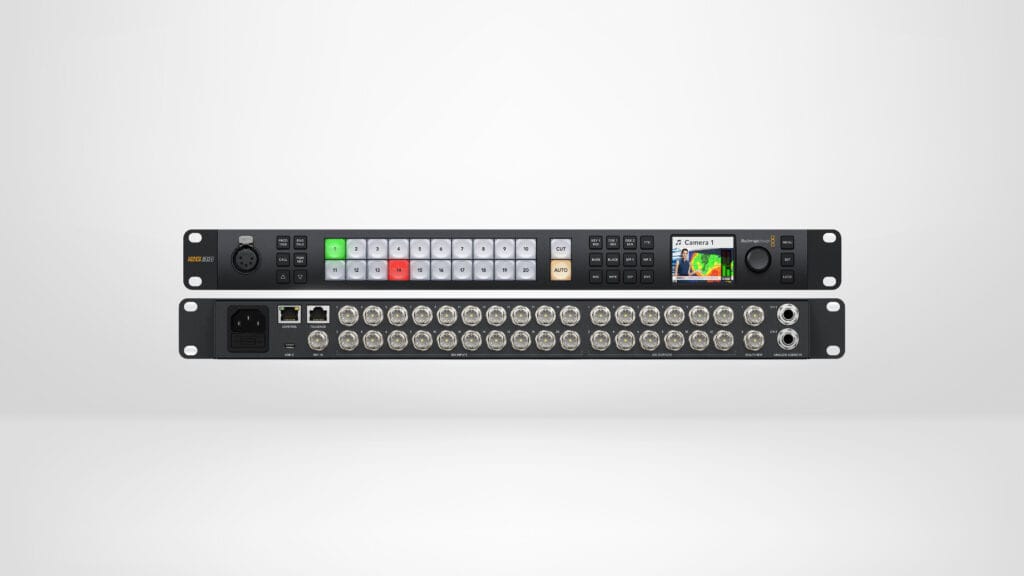
What We Like
- Delivers true 4K UHD output over 12G-SDI with no dropped frames across hundreds of sessions
- Completely reliable across 10 live multicam events — zero crashes or mid-event failures
- SuperSource processor enables polished picture-in-picture and split-screen with a single button press
- 20 SDI inputs with per-input frame rate and format conversion handles mixed camera setups without external converters
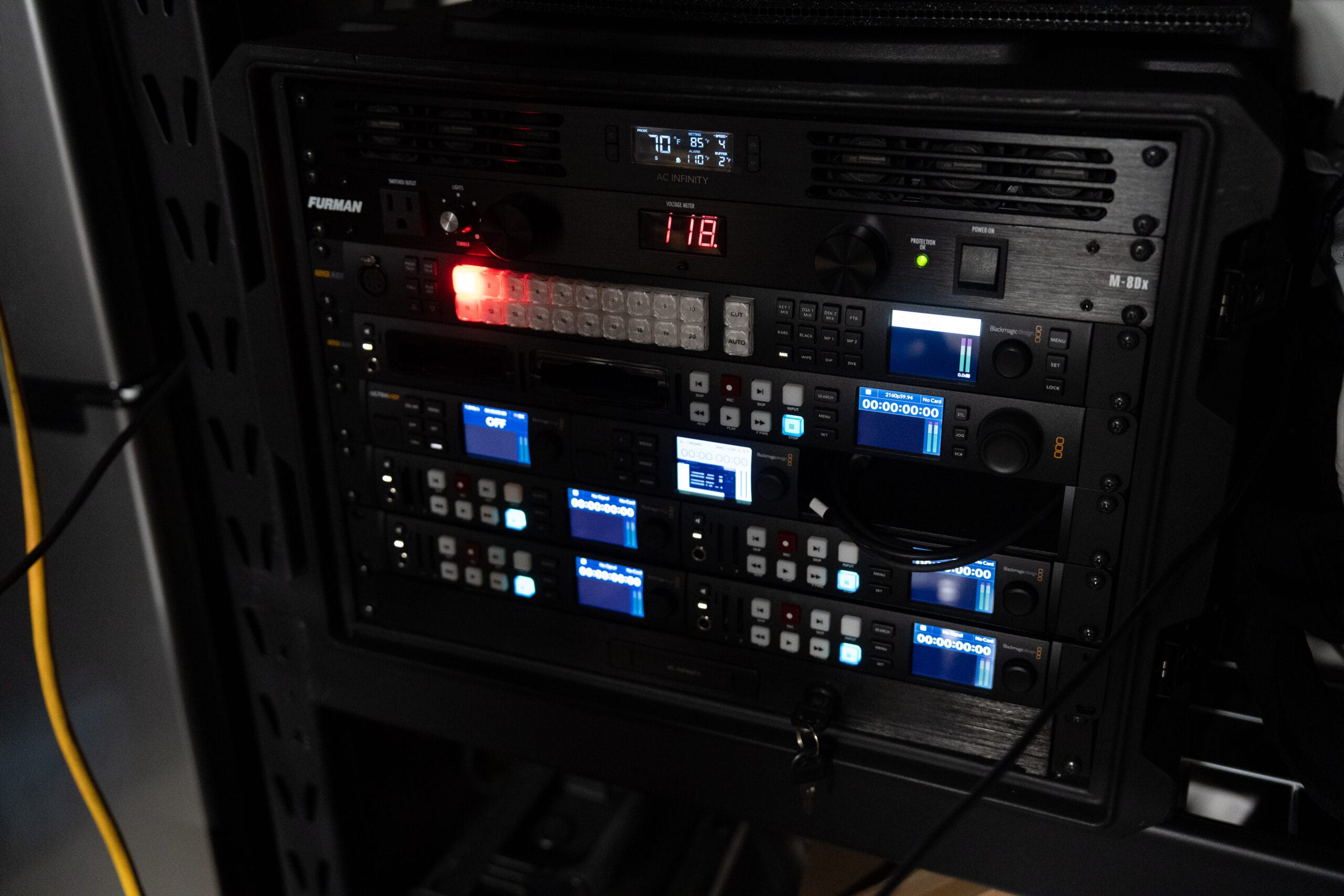
- Self-contained rack system travels to events and is operational with one power and one Ethernet connection
- ATEM Software Control is free, runs on Mac and Windows, and allows full remote control over the network
What Could Improve
- No native ISO recording — per-camera feeds require external HyperDeck units, adding significant cost and rack space
- Steeper learning curve than smaller ATEM devices, and not a desktop solution without an optional hardware control panel purchased separately
- No native record-all button for multiple networked HyperDecks — requires a macro workaround that should be a built-in software feature
Video Review
I’ve been running the Blackmagic ATEM 2 M/E Constellation 4K as the core of my studio production setup since November 2024. In that time I’ve filmed hundreds of YouTube videos, recorded courses and podcasts, and used it to live switch 10 multicam events at venues ranging from high school gyms to small auditoriums. This is not a first-impressions review. This is what it’s actually like to depend on this switcher for professional work day after day.
If you’re trying to decide whether to step up from the ATEM Mini Extreme to the Constellation — or whether this switcher belongs in your live event or studio workflow — this review is written for you. I’m going to tell you what I actually use, what I don’t use, what works, and the one thing I genuinely wish were different.
Key Specs Worth Knowing
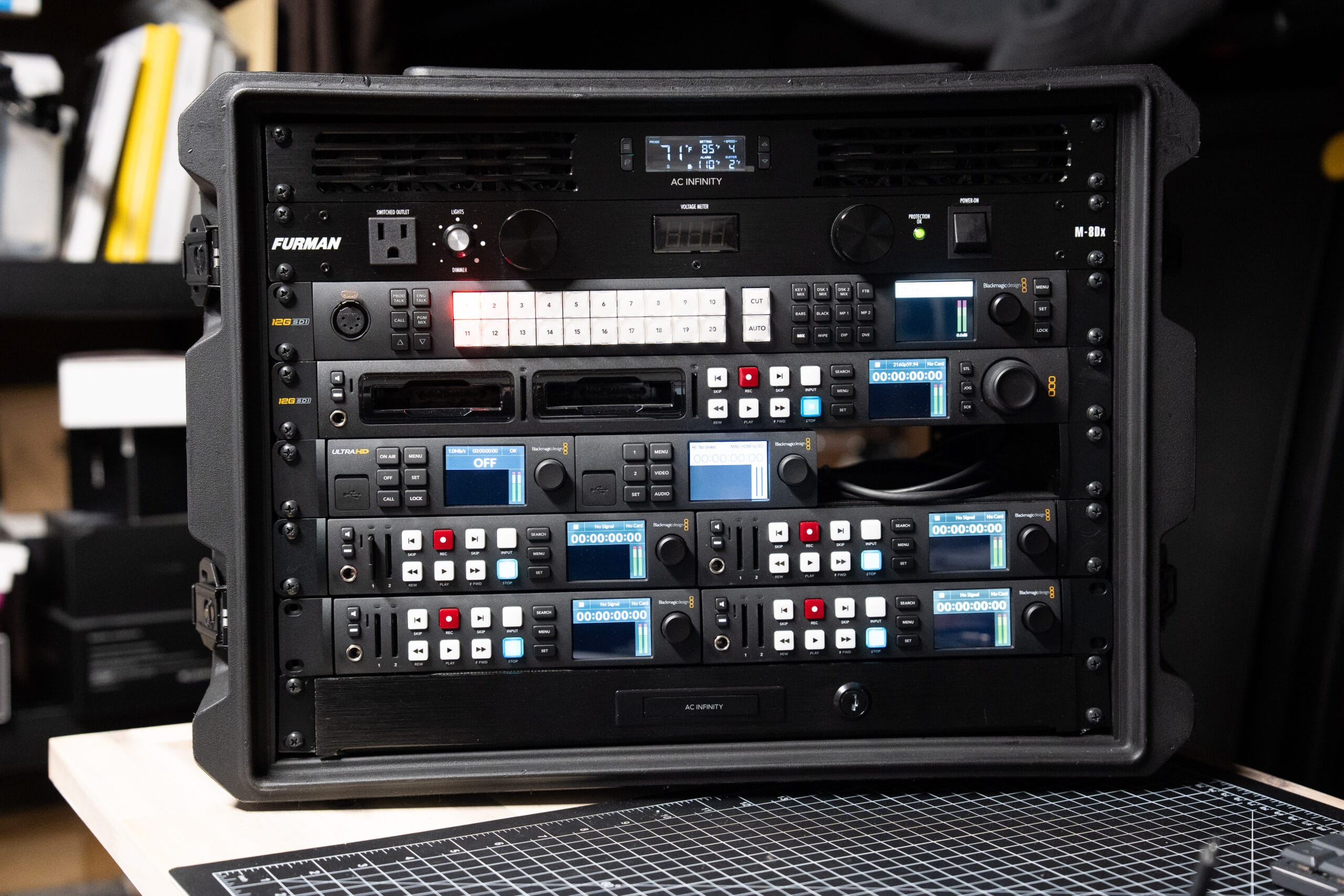
I’m not going to list every spec — Blackmagic’s product page covers that. But a few numbers matter for the decision you’re probably trying to make:
- 20 x 12G-SDI inputs, 12 x 12G-SDI outputs — more than you’ll likely ever use in a typical studio or event setup, which is a good problem to have
- Supports 12G/3G/HD-SDI at 10-bit — meaning it handles 4K, 1080p, and 1080i sources, and the format converter per input means you can mix them freely
- Up to 16-window multiview monitoring output — see all your sources at once on a single monitor
- USB-C webcam output — route your program output directly to a computer as a webcam source without additional hardware
- Fairlight audio mixer with up to 156 input channels — broadcast-grade audio processing built in
- 8 upstream keyers, 2 downstream keyers, SuperSource processor, chroma and luma keying
- Two independent DVEs for picture-in-picture and transitions
- macOS and Windows control via free ATEM Software Control
Street price: Check current pricing here → Blackmagic ATEM 2 M/E Constellation 4K
Who This Switcher Is Actually For
The ATEM Mini Extreme is a great switcher. I used one before this and it did exactly what it promised. But it has a ceiling: 1080p output maximum, HDMI-based connections, and limited channel count. If you’re shooting and delivering in 1080 and running four cameras or fewer, the Mini Extreme is probably still the right tool.
The Constellation is the right step up when one or more of these apply to you:
- You need 4K output — for YouTube, for client deliverables, or because your cameras shoot 4K and you don’t want to downscale
- You’re running SDI cameras or need long cable runs — SDI handles distance in a way HDMI simply doesn’t
- You want a rack-mountable system you can take on location
- You need more than 8 inputs
- You’re building a setup that serves both a studio and live event work
That last point is what makes the Constellation compelling for my workflow specifically. The same switcher that’s switching my three-camera YouTube studio setup on a Tuesday is loaded into a rack case and running a four-camera livestream at an event venue on a Saturday. I’m not maintaining two different systems.
How I Actually Use This Switcher
YouTube & Course Recording
In the studio, I run three cameras into the Constellation: my primary on-camera angle (a Blackmagic Studio Camera 6K Pro), a top-down camera, and an angle pointed at my rack setup for gear demonstrations. All three are Blackmagic cameras running over SDI, so camera control — tally, iris, white balance — comes back through the same cable. No separate control boxes.
I switch everything with an Elgato Stream Deck Pedal running Bitfocus Companion. Left foot cuts to the top-down, right foot cuts to the rack angle, center foot triggers picture-in-picture with the top-down overlaid on my main shot. The Constellation handles all of that switching, and the switched output goes directly to a HyperDeck Studio 4K Pro recording to SSD. When the recording session is done, I pull the drive and hand it off. The video is already cut.
Real talk: I’ve filmed hundreds of videos this way since November 2024. The Constellation has never crashed, never dropped a frame, never required a restart mid-session. For a device I depend on to capture content I cannot reshoot, that reliability is the most important thing I can tell you.
Live Event Streaming
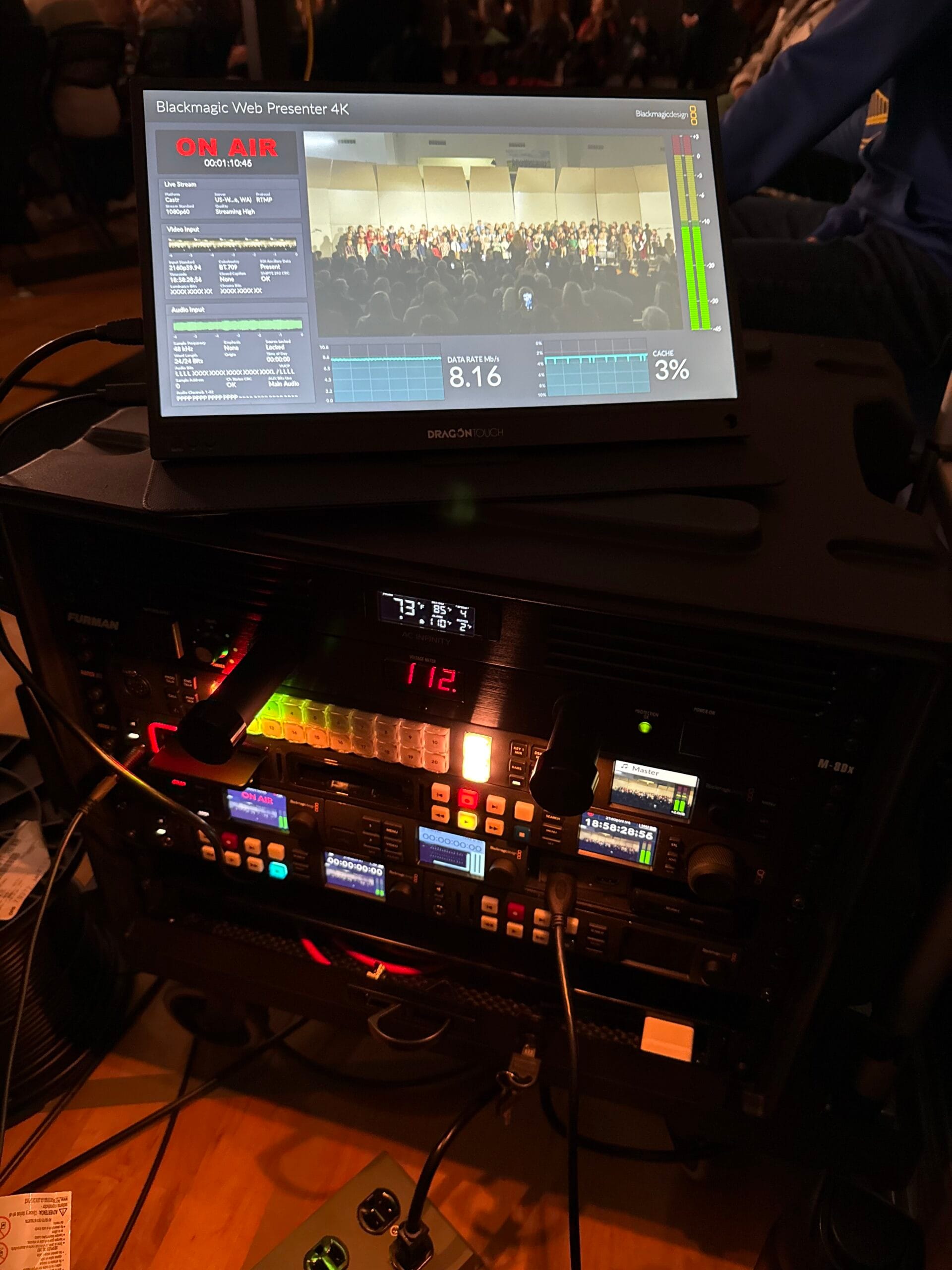
At events I typically run three to four cameras — usually at high school gymnasiums or small auditoriums. The rack case rolls in, I connect cameras to the rear BNC panel, plug in one Ethernet cable and one power cable, and the system is live. The Constellation receives all camera feeds, I switch from a laptop running ATEM Software Control, and the program output goes simultaneously to a HyperDeck 4K Pro for recording and to a Blackmagic Web Presenter 4K for streaming.
Having run 10 of these events now, the workflow is well dialed in. Clients get a fully switched 4K recording at the end of the event — something I couldn’t deliver when I was using the Mini Extreme, which topped out at 1080p. That’s become a genuine differentiator in what I can offer.
At events I get a stereo feed from the venue’s audio board directly into the Constellation. I’m not mixing in Fairlight during a live event — I’m taking a clean premixed feed and routing it through. The Fairlight mixer is capable of a lot more than that, but for live event work where the venue has its own audio engineer, this is the practical reality for most operators.
Podcasts & Multicam Capture
For podcast recording, the workflow is essentially the same as YouTube but with an additional camera if a guest is present. The Constellation handles three or four angles cleanly, the foot pedal manages cuts, and the ISO HyperDeck units record individual camera feeds if I want to do any recuts in post. The SuperSource feature has been particularly useful here — I can create a split-screen or picture-in-picture layout that looks polished without any post-production compositing.
Features I Use Regularly
SuperSource — More Useful Than It Sounds
SuperSource is one of those features that sounds like a production specialty tool you’d never use, but it’s become part of my regular studio workflow. It lets you layer multiple video sources — with independent sizing, positioning, and backgrounds — into a single composite that appears as one input on the switcher.
In practice, I use it for the picture-in-picture overlay where my main camera shot appears in the corner while I’m showing the top-down camera. I set that up once as a SuperSource configuration and it’s a single button press — or foot pedal tap — to activate. The result looks clean and professional, and I’m not doing anything in post to achieve it.
ATEM Software Control & Macros
ATEM Software Control is free and runs on both Mac and Windows. I run it on a Mac Mini that lives inside the rack case, but any laptop connected to the same network or via USB-C works identically. The software gives you full control over switching, audio, media, camera settings, and macro programming.
Macros are worth mentioning specifically. I’ve set up a macro that starts recording on all connected HyperDecks simultaneously. Blackmagic doesn’t currently offer a native “record all” button for multiple networked HyperDecks, so the macro fills that gap. It’s a minor workflow friction point, but the macro solves it well enough.
Fairlight Audio Mixer
I use the Fairlight mixer in the studio for the two audio channels relevant to my setup — mic and camera audio. It’s capable of significantly more than that — EQ, compression, limiting, noise gate across up to 156 channels — but my use case is simple. What I can say is that what I have used works well, and having broadcast-grade audio processing built into the switcher means one less external device in the signal chain.
Frame Rate & Format Conversion Per Input
This is a quiet feature that matters more than it gets credit for. Every input on the Constellation has its own frame synchronizer, frame rate converter, and format converter. In practice this means you can connect cameras running different frame rates or formats and the Constellation handles the conversion internally. At a live event where I might be adding a camera I don’t normally use, not having to worry about format matching is one less variable to manage under pressure.
The One Thing I Wish Were Different
The ATEM Mini Extreme has an ISO version — the ATEM Mini Extreme ISO — that records individual ISO feeds from every input directly, built into the switcher itself. You get the switched output plus each camera’s clean feed in a single device. It’s an elegant solution, especially for smaller setups.
The Constellation does not have an ISO equivalent. To get per-camera ISO recording, you need external HyperDeck units — one per camera. In my setup that means four HyperDeck Studio HD Plus units, which adds cost, rack space, cable management complexity, and the macro workaround for simultaneous record triggering.
My honest take: If Blackmagic released a Constellation ISO version that handled per-camera recording internally, it would be the perfect switcher for this use case. As it stands, the external HyperDeck approach works well — but it adds real cost and complexity that an integrated solution would eliminate. If ISO recording is important to your workflow, budget for the additional HyperDecks and factor in the extra rack space.
It’s also worth noting that ISO recording via individual HyperDecks is entirely optional. If the fully switched output is all you need, a single HyperDeck Studio 4K Pro is all that’s required. The cameras can record to their own media independently. The multi-HyperDeck ISO setup is a choice — not a requirement.
Reliability: The Most Important Section
I’ll keep this short because it deserves to be said plainly. Since November 2024 I have used the ATEM 2 M/E Constellation 4K to film hundreds of videos and run 10 live multicam events. It has never crashed. It has never failed during a recording or a live stream. It has never required a restart at a moment that mattered.
For context: a live event is not a situation where you can troubleshoot a device failure and try again. If the switcher goes down during a graduation ceremony or a performance, there is no recovery. The fact that this device has been completely reliable across 10 events — including events where I was the only operator, switching cameras, managing audio feed, and monitoring stream health simultaneously — matters more than any feature on the spec sheet.
Reliability at this price point, in this use case, earns the premium over budget alternatives.
What You Need Alongside It
The Constellation is a switcher — it needs other components to build a complete production system. Here’s what I pair it with and why:
- HyperDeck Studio 4K Pro — captures the switched program output to dual SSDs. This is the recording device for the main output.
- Blackmagic Web Presenter 4K — handles live streaming via hardware encoding. Keeps the stream running independently of the control computer.
- Blackmagic Studio Camera 6K Pro / Micro Studio Camera 4K G2 — SDI cameras with full ATEM camera control support.
- Elgato Stream Deck Pedal + Bitfocus Companion — hands-free switching in the studio. Highly recommended.
- Gator G-PRO-8U-19 rack case — houses the entire system for transport.
For the complete rack build with all components, wiring details, and pricing, see: My Complete Blackmagic Rack Mount Setup
Final Verdict
I've put the Blackmagic ATEM 2 M/E Constellation 4K through hundreds of studio recording sessions and 10 professional live events since November 2024. My conclusion is straightforward: if you need 4K live switching, SDI connectivity, and a system that serves both a permanent studio and a portable event rig without compromise, this is the switcher to buy at this price point. The step up from the ATEM Mini Extreme is real — in capability, in complexity, and in cost. This is not a plug-and-play desktop device. It requires network-based software control or an optional hardware panel, and Blackmagic's ecosystem has a genuine learning curve that takes time to work through. But once it's dialed in, the operational experience is excellent. The Constellation has been completely reliable across every session and every event — and for live production work, reliability is the most important characteristic of all.
The lack of native ISO recording is the one real limitation compared to the ATEM Mini Extreme ISO. External HyperDecks solve the problem but add cost and rack space. If ISO feeds are part of your workflow, budget for that from the start.
Buy it if: You need 4K output, you're running SDI cameras, you want one system for studio and live events, or you've outgrown the ATEM Mini Extreme's 1080p ceiling.
Skip it if: You're producing 1080p content with four cameras or fewer and live events aren't part of your work — the ATEM Mini Extreme is the better value for that use case.
Frequently Asked Questions
What is the difference between the ATEM Mini Extreme and the ATEM 2 M/E Constellation 4K?
Does the ATEM Constellation 4K support ISO recording?
Do I need a hardware control panel to use the ATEM Constellation 4K?
Is the ATEM Constellation 4K reliable enough for live event production?
What cameras work with the ATEM 2 M/E Constellation 4K?
Can I use the ATEM Constellation 4K for a YouTube studio setup?
How steep is the learning curve for the ATEM Constellation 4K?
